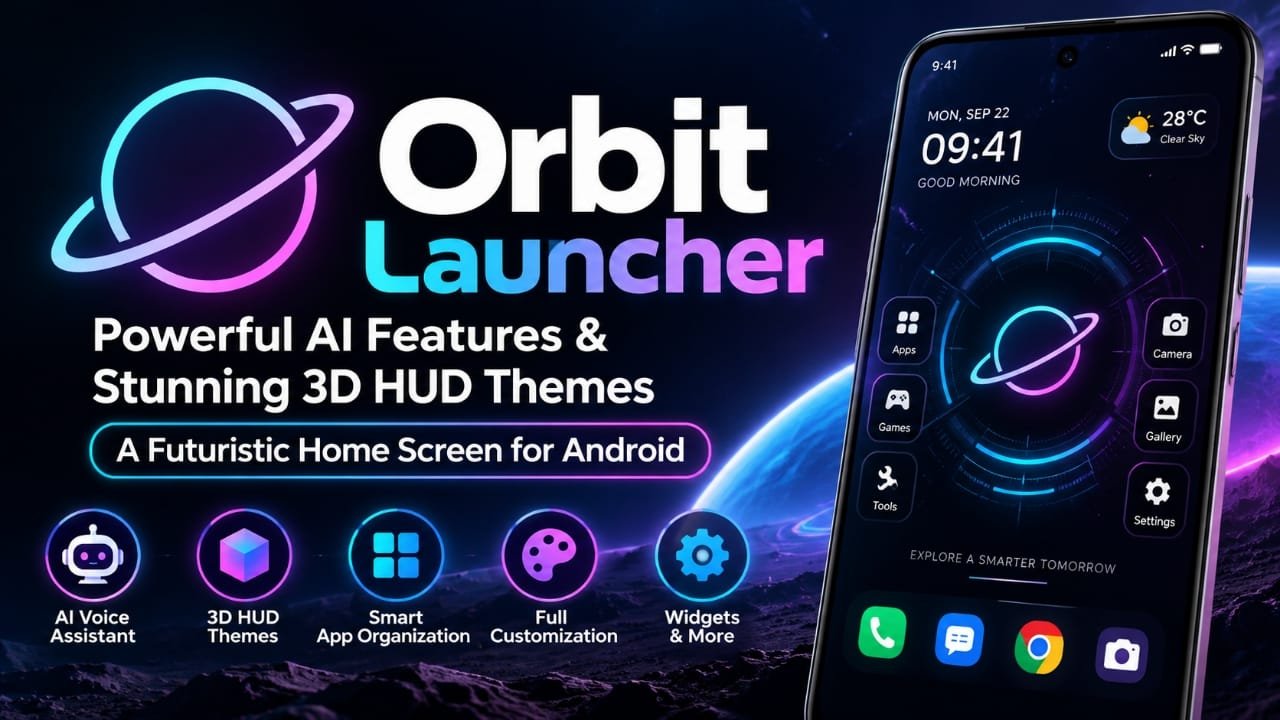
If you are bored with the standard Android home screen and want something that looks completely different, Orbit Launcher is an interesting option to explore. Instead of focusing only on changing icons or wallpapers, the launcher combines a futuristic 3D HUD-style interface with AI features, app organization tools, widgets and several customization options.
The app is listed on Google Play as Orbit Launcher Sci-fi AI Theme by App Mania Software Development. The listing currently shows 50K+ downloads, a 4.4-star rating and an update dated August 21, 2026. It also contains ads and in-app purchases.
So, what does Orbit Launcher actually offer, and is it suitable for someone looking for a futuristic Android home screen? Let’s take a closer look.
Also read: GO Launcher S Review: 3D Themes, HD Wallpapers and Android Customization
What is Orbit Launcher?
Orbit Launcher is an Android home screen replacement designed around a sci-fi and futuristic interface. Its main visual feature is a 3D HUD-style design, giving the home screen the appearance of a digital control panel rather than a traditional Android launcher.
The launcher also includes an AI voice assistant, smart app organization, parallax wallpapers, custom icon-pack support, widgets and utility features such as global search and an on-screen system information display. These features are listed by the developer on Google Play.
This makes Orbit Launcher particularly relevant to Android users who enjoy cyberpunk, sci-fi, gaming or technology-inspired interfaces.
Key Features of Orbit Launcher
1. Futuristic 3D HUD Interface
The biggest reason to try Orbit Launcher is its visual design.
Instead of presenting apps in a conventional grid, the launcher uses a futuristic HUD-inspired interface with animated elements and a circular-style presentation. The Google Play listing also highlights sci-fi and cyberpunk themes, animated glow effects and 3D visual elements.
For users who like a high-tech appearance, this can make the phone feel noticeably different from the default launcher.
2. Gemini-Powered AI Voice Assistant
Orbit Launcher also promotes an AI voice assistant powered by Gemini.
According to the Play Store listing, the assistant can be used for tasks such as opening apps, reading news and handling commands through voice interaction.
This is more than a visual customization feature because it adds a voice-based interaction layer to the launcher.
However, the exact capabilities of AI features can change with app updates and service availability, so users should check the current Play Store description before relying on a particular command or function.
3. Smart App Organization
Finding an app among dozens of installed applications can become inconvenient. Orbit Launcher addresses this with a Smart App Library that can automatically organize apps into categories such as Social, Games and Shopping.
This can reduce the need to manually arrange every application.
The feature is particularly useful if you install a large number of apps and prefer an automatically organized app drawer.
4. Parallax Wallpapers and Sci-Fi Themes
Orbit Launcher supports gyroscope-based parallax wallpapers. This means the wallpaper can respond to movement of the phone to create a sense of depth.
The launcher also offers sci-fi and cyberpunk-style backgrounds and HUD-themed visuals.
For someone who wants a futuristic home screen rather than a minimal setup, these visual effects are likely to be one of the main attractions.
5. Custom Icon Packs
Customization isn’t limited to the built-in themes.
The Google Play listing says Orbit Launcher supports third-party icon packs. This gives users more flexibility when creating a particular visual style.
You can therefore combine a futuristic launcher layout with an icon pack that matches your preferred look.
6. System Information HUD
Another interesting feature is the System HUD Overlay.
According to the developer’s listing, it can display information such as battery, RAM and storage directly through the launcher’s dashboard.
This gives the home screen a more technical appearance while also putting some device information within quick reach.
7. App Lock and Hide Apps
Orbit Launcher also includes privacy-oriented launcher utilities. The Play Store description says users can lock apps with a password or hide apps from the launcher grid.
Keep in mind that a launcher-level app lock or hiding feature should not automatically be treated as a replacement for Android’s built-in security features. The exact protection offered can depend on the device and Android version.
8. Built-in Widgets and Global Search
The launcher includes an all-in-one widget suite with features such as weather, music, news and flashlight access. It also provides global search for finding apps, contacts or web results from the home screen.
For users who want more information and shortcuts directly on the home screen, these tools can be useful.
Is Orbit Launcher Good for Customizing an Android Phone?
Orbit Launcher is aimed at a very specific type of Android user.
If you prefer a simple home screen with minimal animations, its futuristic interface may feel unnecessarily busy. But if you enjoy experimenting with wallpapers, icons, animations and unusual launcher layouts, its feature set gives you plenty to explore.
The main difference is that Orbit Launcher treats the home screen as part of the overall visual experience rather than simply a place for app shortcuts.
Orbit Launcher: Pros and Cons
| Pros | Cons |
|---|---|
| Futuristic 3D HUD-style interface | Some visual effects may not appeal to users who prefer minimal layouts |
| Gemini-powered AI voice assistant | AI features may depend on supported services and app versions |
| Sci-fi and cyberpunk themes | More animations can potentially affect battery or performance on some devices |
| Parallax wallpaper support | Feature-rich interfaces can take time to configure |
| Third-party icon-pack support | Contains ads and in-app purchases |
| Smart app organization | Privacy/data practices should be reviewed before granting permissions |
| Built-in widgets and global search | Experience can vary between Android devices |
Privacy and Data Safety
Privacy is an important consideration when installing a launcher because a launcher can interact closely with the Android home screen and certain device functions.
The developer states on Google Play that Orbit Launcher does not collect or sell personal data and says its Accessibility Service is used for gesture-related features such as double-tap-to-lock and screenshot shortcuts.
At the same time, Google’s Data Safety section currently states that the app may collect app activity and may share location, app activity and two other data types with third parties. Google also notes that the information in this section is provided by the developer and can vary by region, age and other factors.
Because these disclosures can change with app updates, users should check the current Data Safety section and requested permissions on Google Play before installing or enabling additional services.
Who Should Try Orbit Launcher?
Orbit Launcher may be worth considering if you are:
- Interested in futuristic Android launchers
- A fan of sci-fi or cyberpunk designs
- Looking for a 3D-style home screen
- Interested in AI-powered launcher features
- Someone who enjoys changing wallpapers and icons
- Looking for built-in widgets and launcher utilities
- Interested in experimenting with a different Android interface
It may be less suitable if your priority is an extremely simple, distraction-free home screen.
Things to Check Before Installing
Before making Orbit Launcher your default launcher, keep a few things in mind.
Check your device’s performance: Animated interfaces and graphical effects can behave differently across Android phones.
Review permissions: A launcher may require additional permissions for certain features. Only grant permissions that you are comfortable with.
Check the current Play Store listing: Features, pricing, advertisements, in-app purchases and privacy disclosures can change after updates.
Try it before fully switching: If your phone allows it, experiment with the launcher first and make sure your navigation, widgets and important shortcuts work as expected.
Frequently Asked Questions
What is Orbit Launcher?
Orbit Launcher is an Android launcher focused on futuristic 3D HUD-style visuals, AI features, customization, widgets and smart app organization. It is published on Google Play by App Mania Software Development.
Does Orbit Launcher have AI features?
Yes. The current Google Play listing says Orbit Launcher includes a Gemini-powered AI voice assistant for voice-based commands and other interactions.
Does Orbit Launcher support 3D or futuristic themes?
Yes. The launcher promotes 3D HUD-style visuals, sci-fi and cyberpunk themes, parallax wallpapers and animated interface effects.
Can Orbit Launcher organize apps automatically?
Yes. Its Smart App Library is described as automatically sorting apps into categories such as Social, Games and Shopping.
Does Orbit Launcher support widgets?
Yes. The listing says the launcher supports third-party widgets and includes built-in tools such as weather, music, news and flashlight widgets.
Is Orbit Launcher free?
The current Google Play listing shows Orbit Launcher as containing ads and in-app purchases. The exact paid features or pricing can change, so check the current Play Store page before installing.
Official Play Store Link
Also read: Lighter Simulator Concert Mode for Android: Realistic Flames, Themes and Concert Effects
Final Verdict
Orbit Launcher takes a different approach to Android customization. Its combination of 3D HUD visuals, sci-fi themes, AI voice features, smart app organization, parallax wallpapers, widgets and launcher utilities makes it more than a basic icon-and-wallpaper customization tool.
Its strongest appeal is likely to be users who want their Android phone to have a distinctive futuristic appearance. At the same time, the number of visual effects and features means it may not be the right fit for someone who prefers a simple home screen.
If you are interested in trying it, use the official Google Play listing to check the latest version, permissions, pricing and Data Safety information before installing.

Abhi Rajput, founder of Earnabhi.com, is a tech lover with 6+ years of experience in SEO, digital tools, and smartphone troubleshooting. He writes simple, clear, and useful guides to help people solve real tech problems.