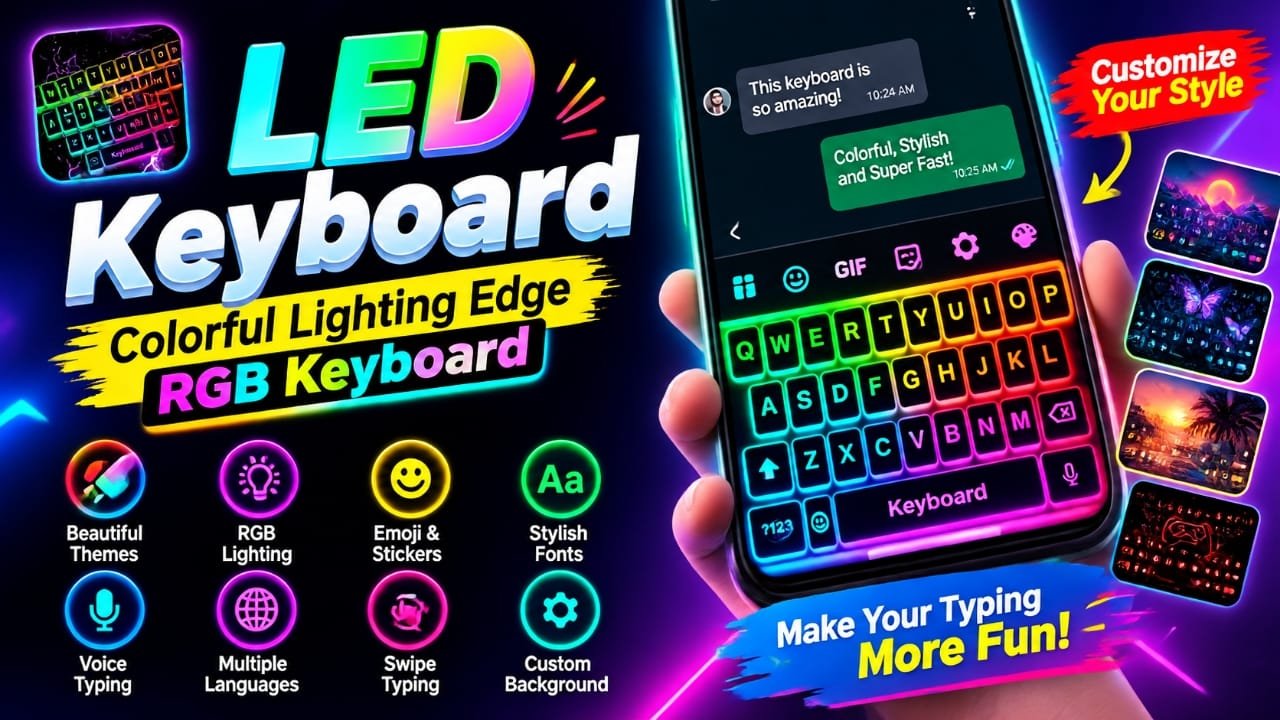
If you are bored with the standard keyboard on your Android phone, a colorful keyboard app can give your typing screen a completely different look. LED Keyboard – Colorful Lighting Edge RGB Keyboard focuses on RGB lighting, glowing effects, themes, emojis, fonts and keyboard customization.
The app is currently listed on Google Play as LED Keyboard Neon Themes Glow by Zayzik: LED Keyboard Studio. Its listing says it offers animated RGB effects, customizable themes, fonts, emojis, GIFs, stickers, multiple languages and typing tools such as swipe and voice typing.
Here is what you should know about the app before using it.
Also read: Neon RGB Volume Customization App: Add Neon and RGB Effects to Your Android Volume Panel
What Is LED Keyboard – Colorful Lighting Edge RGB Keyboard?
LED Keyboard is an Android keyboard customization app designed for people who want something more visually interesting than a standard keyboard.
Instead of using a plain keyboard layout, you can choose from colorful and neon-inspired designs, add lighting effects and customize elements such as the background, key colors, gradients and fonts.
The current Google Play listing also mentions a keyboard editor, allowing users to create a more personalized design using their own photo or background.
The app is mainly focused on keyboard appearance and personalization, although it also includes several everyday typing features.
Key Features of the LED Keyboard App
RGB Lighting and Glowing Effects
The main attraction is the RGB-style lighting.
The keyboard can display colorful animations and glowing effects while you type. According to the Google Play listing, users can adjust colors and effects to create anything from a subtle glow to a brighter RGB-style keyboard.
This makes the keyboard particularly interesting for users who enjoy neon, gaming-inspired or colorful phone themes.
Large Selection of Keyboard Themes
The app includes different visual styles rather than limiting users to one design.
The Play Store listing mentions themes and styles such as:
- Neon
- Cute
- Aesthetic
- Gaming
- Romantic
- Floral
- Rainbow
- Black
- Gold
- Cartoon
- Football
- Car
- Cat and other designs
Availability of individual themes can change as the app is updated.
Create a Custom Keyboard
One useful feature is the keyboard editor.
You can use your own photo or another background and customize parts of the keyboard, including key colors, gradients and fonts. Lighting animations and typing sounds can also be combined with the design.
This gives you more control than simply selecting a ready-made theme.
Emojis, GIFs and Stickers
The keyboard also includes emoji, GIF, sticker, symbol and emoticon options.
These features can be useful when chatting because you do not always need to leave the keyboard to find visual content for a message.
Fonts and Stylish Text
The app promotes different font styles that can be used while typing.
This can be useful for social media posts, messages or other casual text where you want a different visual style. However, how a particular font appears can depend on the app receiving the text.
Swipe and Voice Typing
The app is not limited to visual customization.
Its Google Play description lists swipe typing, word suggestions and voice typing among its typing features. It also includes tools such as copy, paste and clipboard functions.
Multiple Languages
The keyboard supports multiple languages and layouts. The current listing specifically names languages including English, Arabic, French, German, Spanish, Portuguese, Italian, Indonesian, Malay, Filipino, Polish, Dutch, Russian, Turkish, Korean and Vietnamese, among others.
The exact availability of a language or keyboard layout can depend on the current version of the app.
How to Use LED Keyboard on Android
The exact menus can vary depending on the Android phone and the app version, but the basic process is straightforward.
Step 1: Install the App
Open the Google Play Store and search for LED Keyboard Neon Themes Glow.
The current listing identifies the developer as Zayzik: LED Keyboard Studio. Check the developer name and app details before installing so you select the intended app.
Step 2: Open the Keyboard App
After installation, launch the app and follow its setup instructions.
Because this is a keyboard application, Android may ask you to enable or select it as a keyboard before you can use it for typing.
Step 3: Select a Keyboard Theme
Browse the available keyboard designs and choose a style you like.
You can look for neon, colorful, gaming-inspired, dark or other designs depending on what is available in your version of the app.
Step 4: Customize the Keyboard
If you want a more personal design, open the customization or keyboard editor options.
Depending on the available options, you can adjust elements such as:
- Background
- Key colors
- Gradients
- Fonts
- Lighting effects
- Typing sounds
The app also allows a custom photo or background to be used for the keyboard, according to its current Play Store description.
Step 5: Test It in a Messaging App
Once the keyboard is enabled, open an app where you normally type.
Try sending a message or entering text in a search box to make sure the keyboard layout, language and visual effects work as expected.
Is LED Keyboard Safe for Privacy?
Keyboard apps deserve extra attention because they can be involved whenever you type information.
The developer’s Play Store description says that the app does not collect or store the text typed through the keyboard.
However, Google’s Data safety section currently provides additional information. It states that the app may share app info and performance data and device or other IDs with third parties. It also states that no data is collected, that data is encrypted in transit and that data cannot be deleted. These disclosures are developer-provided and may change over time.
For that reason, users should check the current Google Play Data safety information and the app’s privacy policy before deciding whether they are comfortable using a third-party keyboard.
As a general precaution, avoid entering highly sensitive information into any third-party keyboard unless you understand its privacy practices.
Does the App Have Ads?
Yes. The current Google Play listing shows Contains ads and In-app purchases.
Recent Google Play reviews also include complaints from some users about the number of advertisements. These are individual user reports rather than a measurement of the app’s overall advertising experience, but they are useful to consider before installation.
The developer has responded to some of these reviews and acknowledged the feedback about ads.
Who Is This Keyboard App For?
LED Keyboard is mainly aimed at Android users who enjoy customizing the appearance of their phone.
It may appeal to:
- Users who like RGB and neon designs
- People who want colorful keyboard themes
- Gaming-style customization fans
- Social media users who enjoy stylish fonts and emojis
- Users who want to create a custom keyboard background
- Anyone who finds the default keyboard visually boring
If you primarily care about advanced typing accuracy or productivity rather than appearance, you may want to compare it with other established keyboard apps before switching.
Things to Consider Before Installing
The app has plenty of customization features, but there are a few points worth checking.
Ads: The Google Play listing currently shows ads, and some recent reviews complain about the advertising experience.
Privacy: The developer says typed text is not collected or stored, but Google’s Data safety section separately indicates potential sharing of app information/performance data and device or other IDs. Read the current disclosures before enabling a third-party keyboard.
Keyboard permissions: Android keyboard apps require access appropriate to their keyboard functionality. Users should review the permissions and privacy information rather than enabling a keyboard without checking what it does.
Features can change: Themes, languages, advertisements and other functions may change with future updates.
Official Play Store Link
Also read: Batix – Charging Photo: Customize Your Android Charging Screen With Photos and Animations
Final Verdict
LED Keyboard – Colorful Lighting Edge RGB Keyboard is primarily a keyboard customization app for Android users who want RGB effects, glowing animations and colorful themes instead of a plain keyboard.
Its current Google Play listing also highlights custom backgrounds, fonts, emojis, GIFs, stickers, swipe typing, voice typing and multiple language support.
The main thing to consider before installing is not just the design options but also the current advertising and privacy disclosures. If those are acceptable to you, the app provides plenty of ways to change the look of your Android keyboard.
Frequently Asked Questions
What is LED Keyboard – Colorful Lighting Edge RGB Keyboard?
It is an Android keyboard customization app that provides RGB lighting effects, colorful themes, custom backgrounds, fonts, emojis and other typing features. The current Google Play listing uses the name LED Keyboard Neon Themes Glow.
Does LED Keyboard support emojis and GIFs?
Yes. The app listing mentions emojis, GIFs, stickers, symbols and emoticons.
Does the keyboard support voice typing?
Yes. Voice typing is listed among the app’s typing features.
Does LED Keyboard contain ads?
Yes. Google Play currently marks the app as containing ads and offering in-app purchases.
Does LED Keyboard collect typed text?
The developer’s Play Store description says it does not collect or store text typed through the keyboard. However, Google’s Data safety section says the app may share app info/performance data and device or other IDs with third parties. Check the latest disclosures before installation because privacy information can change.

Abhi Rajput, founder of Earnabhi.com, is a tech lover with 6+ years of experience in SEO, digital tools, and smartphone troubleshooting. He writes simple, clear, and useful guides to help people solve real tech problems.