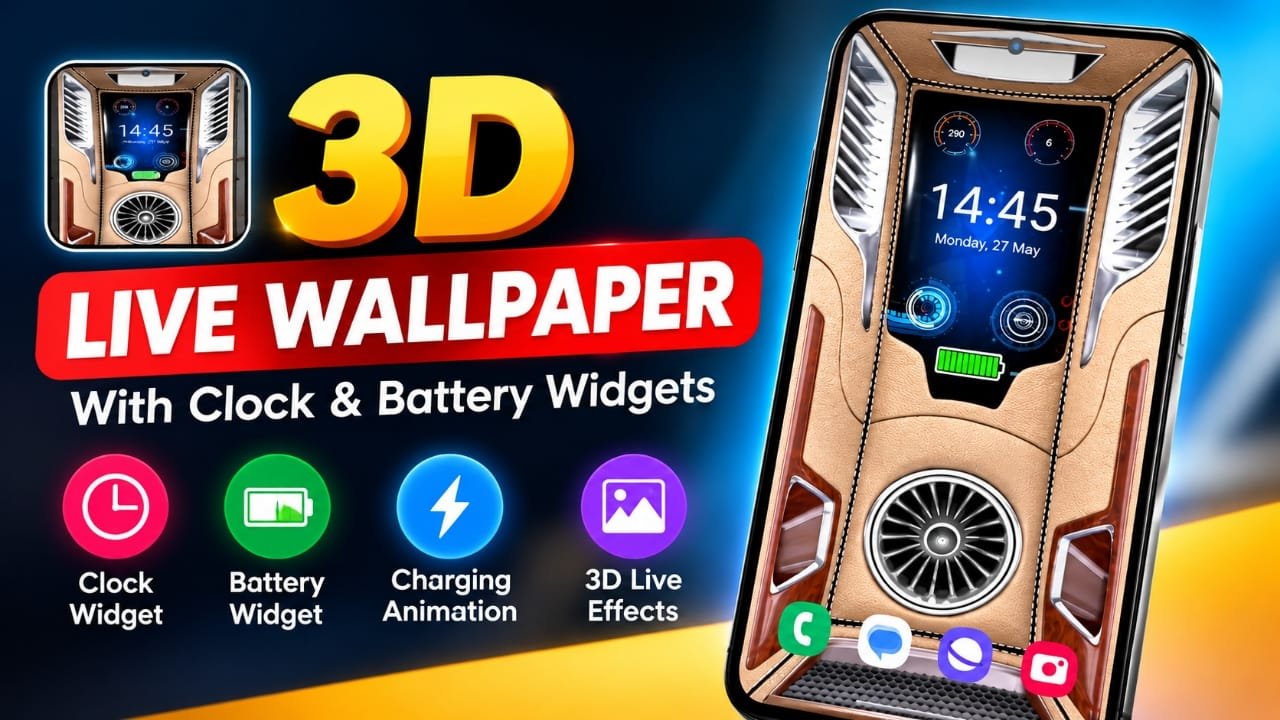
If you want to give your Android phone a more dynamic home-screen look, a live wallpaper app can be a simple way to customize it. Unlike a regular static wallpaper, live wallpapers can add animation, depth effects, clocks, battery information, and charging visuals directly to the screen.
One app in this category is 3D Live Wallpaper & Widgets, which combines animated backgrounds with widgets and customization options. In this article, we’ll look at the features described for this type of app, what you can customize, and a few things to consider before using a live wallpaper.
Also read: 3D Photo Live Wallpaper: Turn Your Photos Into a Rotating 3D Cube
What Is an Android Live Wallpaper App?
An Android live wallpaper app lets you use an animated or interactive background instead of a standard still image.
Depending on the app, the wallpaper may include effects such as:
- 3D or parallax-style movement
- Digital or analog clocks
- Battery percentage
- Charging animations
- Date and day information
- Animated backgrounds
- Customizable widgets
The exact features available can vary by app and Android version, so it is a good idea to check the app’s current Play Store listing before installing it.
Why Use a 3D Live Wallpaper?
A 3D live wallpaper can make the home screen feel more interactive. Parallax-style effects, animation and depth can create the impression that elements are moving as you tilt or interact with the phone.
This can be particularly appealing if you enjoy customizing your Android interface.
However, live wallpapers use system resources because they have to render animations. Battery and performance impact can therefore vary depending on the wallpaper, animation settings, phone hardware and Android version.
Key Features to Look For
1. 3D Live Wallpaper Effects
The main attraction is usually the animated background. A 3D-style wallpaper can add movement and depth instead of leaving the home screen completely static.
Some designs may also respond to phone movement, creating a parallax effect.
2. Digital and Analog Clock
A clock can be displayed directly over the wallpaper, making the home screen more useful at a glance.
Depending on the available customization options, users may be able to adjust things such as:
- Clock style
- Font
- Size
- Color
- Position
The available options depend on the particular app.
3. Battery Information
Some live wallpaper and widget apps can display battery-related information on the home screen.
Possible options include:
- Battery percentage
- Charging status
- Charging animation
- Battery-related indicators
Keep in mind that battery health information is different from the current battery percentage. If an app claims to provide detailed battery-health data, the accuracy and availability of that information can depend on Android’s permissions and the device.
4. Charging Animation
Charging animations can replace the plain charging screen with a more visual effect.
For users who like customizing their phone, this can be a nice addition, although it is primarily a visual feature rather than something that improves charging speed or battery performance.
5. Customization Options
Customization is one of the main reasons people use live wallpaper apps.
Depending on the app, settings may include:
- Animation speed
- Text color
- Background effects
- Widget placement
- Clock appearance
- Wallpaper selection
This allows users to create a home screen that matches their preferred style instead of using the same default appearance as everyone else.
Is a Live Wallpaper App Good for Your Phone?
That depends on what you want from your home screen.
If your priority is customization and animated effects, a live wallpaper can make the interface more visually interesting. If you prefer maximum battery efficiency or a very simple home screen, a static wallpaper may be more suitable.
Before choosing a live wallpaper, consider:
- Battery usage: Animation can consume additional resources.
- Performance: Older or lower-end phones may handle some animated wallpapers less smoothly.
- Customization: Check whether the app offers the clock, battery and effects you actually want.
- Permissions: Review the permissions requested by the app before installation.
- Android compatibility: Features can differ between Android versions and manufacturers.
Who Might Like This Type of App?
A 3D live wallpaper with widgets may be useful for:
- Android customization enthusiasts
- Users who like animated home screens
- People who want a clock on their wallpaper
- Users interested in charging animations
- Content creators looking for different phone-screen designs
- Anyone who wants to experiment with a more interactive home screen
How to Try the App
The app mentioned in the source material is available through Google Play:
3D Live Wallpaper & Widgets on Google Play
Before installing, check the current Play Store listing for its latest features, compatibility, developer information, permissions and user reviews. App features can change through updates.
Things to Check Before Installing
A live wallpaper app is mainly a customization tool, so there are a few practical checks worth making.
Check the permissions: Only grant permissions that make sense for the features you want to use.
Watch battery consumption: If you notice unusual battery drain after applying an animated wallpaper, try reducing animation effects or switching back to a static wallpaper.
Check performance: If animations feel slow or the phone becomes less responsive, a simpler wallpaper may work better.
Review the latest app information: The Play Store listing is the appropriate place to verify the current version, compatibility and available features.
Frequently Asked Questions
What is a 3D live wallpaper on Android?
It is an animated wallpaper that can use movement, depth or parallax-style effects to create a more dynamic home-screen appearance.
Can a live wallpaper show the battery percentage?
Some live wallpaper apps include battery widgets or indicators. The exact options depend on the individual app.
Can I use a live wallpaper without rooting my phone?
Live wallpapers generally do not require root access. They are designed to work through Android’s normal wallpaper system, although compatibility can vary by device.
Do live wallpapers consume more battery?
They can. Because animated wallpapers require processing to render movement and effects, their battery impact may be higher than that of a static wallpaper. The actual difference depends on the app and phone.
Can I customize the clock?
Some apps provide clock customization such as different styles, colors, sizes and positions. Check the specific app’s current feature list to confirm which options are available.
Is this app suitable for every Android phone?
Not necessarily. Compatibility and available features can vary depending on the Android version, phone manufacturer and device hardware. Check the current Google Play listing before installing.
Official Play Store Link
Also read: Hair Cut Trimmer Prank: Turn Your Phone Into a Realistic Hair Clipper
Conclusion
A 3D live wallpaper can be a simple way to change the look of an Android phone. Features such as animated backgrounds, depth effects, clocks, battery indicators and charging animations can make the home screen more interactive.
The 3D Live Wallpaper & Widgets app mentioned here is an option to explore if you are specifically looking for this combination of customization features. Before installing, check its current Play Store information and consider battery usage, permissions and device compatibility.

Abhi Rajput, founder of Earnabhi.com, is a tech lover with 6+ years of experience in SEO, digital tools, and smartphone troubleshooting. He writes simple, clear, and useful guides to help people solve real tech problems.